Changelog
Changelog
2.0 (In Development)
Release Notes
DVR-Scan v2.0 overhauls how timestamps are handled. Motion events are now tracked using presentation timestamps (PTS), which means variable framerate (VFR) videos are handled correctly with default parameters.
Changelog
- [general] DVR-Scan now requires PySceneDetect 0.7 or higher
- [feature] Variable framerate (VFR) videos are now handled correctly: event start/end times are always derived from presentation timestamps #20
- [breaking] Remove
--use-ptsoption; presentation timestamps are now always used for event timing (theuse-ptsconfig option is deprecated and has no effect) - [general] Reported event timecodes are now exact rather than quantized to whole frames; formatted timecodes may differ by up to 1ms from previous versions. Frame numbers shown in reports and overlays are approximations on VFR inputs.
- [general] When using
--frame-skip, the post-event window now covers the exact amount of time specified rather than rounding down to a multiple of the skip interval, and back-to-back events share their boundary timecode instead of leaving a one-frame gap. - [feature] Frames are now decoded with PyAV by default (
input-mode = pyav), which provides more accurate timing and stream metadata; setinput-mode = opencvto restore the previous behavior - [feature] Multiple input videos are concatenated on a continuous PTS-based timeline with support for seeking across inputs; frame rates no longer need to match exactly
- [general] Videos with a delayed start (nonzero stream start time) now report event timecodes relative to the start of the file with all input modes
- [general] Reported event boundaries may shift by a frame or two compared to previous releases, as PyAV and OpenCV decode frames with slightly different color conversion
- [feature] New output mode
encodeproduces MP4 (H.264) files by piping decoded frames to ffmpeg, combining the quality offfmpegmode with support for overlays (-bb/-tc/-fm), multiple inputs, and combined output (-o, video-only); audio from the source video(s) is included and synchronized, including events spanning multiple inputs. Encoder settings can be customized with the newencode-argsconfig option. #197 - [bugfix] Motion events extracted from multiple input videos are now named after the source video containing the start of each event, instead of always using the first input's filename #258
- [breaking] The default output mode is now
encode(MP4/H.264 via ffmpeg) instead ofopencv(.avi), so motion events now include audio and are saved as .mp4 by default. If ffmpeg is not installed and no output mode is set, DVR-Scan falls back toopencvwith a warning. Setoutput-mode = opencvin a config file (or use-m opencv) to restore the previous behavior. - [feature] New
--reportoption writes detected events to a CSV or JSON file (format set by extension), including in scan-only mode; the GUI's Save Report dialog can also save JSON reports. CSV reports now include exact start/end times in seconds (frame numbers are approximations on variable framerate inputs). #221 - [bugfix] Thumbnails (
--thumbnails highscore) are now named after the source video containing each event when scanning multiple inputs, and are numbered correctly in scan-only mode (previously each event's thumbnail overwrote the last one) - [bugfix] Using
--thumbnails highscoretogether with-o/--outputno longer overwrites the combined output video with the thumbnail image; thumbnails are named after the combined output file instead - [general] On VFR inputs, clips produced by
encodemode are written at the input's average framerate: all frames are preserved, but playback speed will deviate from real time in sections whose local framerate differs from the average (useffmpegorcopymode if exact playback timing is required) - [bugfix] Fix syntax error due to f-string usage under Python 3.10 #262
- [bugfix] Ensure motion high score is reset when thumbnails are disabled #267
- [bugfix] Fix "stale" frame references being used as thumbnails #268
- [bugfix] Ensure comma-separated timecode list persists in logfiles #265
- [bugfix] Allow unknown keys in config file with a warning #242
- [feature] Add a
--max-events Nflag to allow stopping after detectingNmotion events #261 - [feature] New
--merge-window/merge-windowoption controls how close two groups of motion must be for them to be merged into the same event;-tb/-tpare now pure padding added around each event and no longer affect merging. The default (auto) uses the same value astime-post-event, which matches the merging behavior of previous versions. Settingtime-post-eventlarger thanmerge-windowcaps the post-event padding to the merge window with a warning. #195 #72
1.8.2.1 (2026-05-09)
Re-release of Python distribution that fixes dependency pinning.
1.8.2 (2026-01-18)
Release Notes
Includes several critical bugfixes and improvements when processing multiple input videos.
Changelog
- [general] Minimum supported Python version is now 3.10 (Python 3.9 is EOL)
- [general] An error is now displayed when launching the app fails due to an invalid config file #241
- [general] Python package now only depends on
opencv-contrib-pythonoropencv-contrib-python-headless#251 - [bugfix] Fix
quiet-modesetting (-q/--quietflag) still allowing extraneous output #243 - [bugfix] Fix loading config from file in UI #253
- [bugfix] Fix scan error when enabling "Use PTS" input option with multiple videos #254
- [bugfix] Fix unchecked UI options being turned on in config files #256
1.8.1 (2025-08-27)
Release Notes
Fixes issue with application not loading config files saved with v1.8.
Changelog
- [general] Add
--ignore-user-configflag to bothdvr-scananddvr-scan-appcommands to allow the application to run even if the user config file is corrupted - [general] Add new
scan-onlyconfig option to match the UI checkbox and the--scan-onlyCLI flag - [bugfix] Fix crash on startup when trying to load user config saved with v1.8 #240
- This was caused by the
scan-onlyUI option being emitted but the config file did not support it in v1.8 - Users who are running into this issue should be able to run DVR-Scan after updating to v1.8.1
- As a workaround for previous versions, you can manually remove the
scan-onlyline in the saved config file
- This was caused by the
1.8 (2025-08-23)
Release Notes
DVR-Scan 1.8 includes several UI additions and enhancements, and fixes a long-standing issue with Python packaging dependencies.
Changelog
- [general] The Python distribution now correctly requires
opencv-python#204- There is a separate
dvr-scan-headlesspackage available for servers which requiresopencv-python-headlessand only includes CLI functionality
- There is a separate
- [bugfix] Fix bounding box overlay stuck on when using the OpenCV output mode #218
- [feature] UI additions and enhancements:
- [feature] Add
max-area,max-width, andmax-heightoptions to help suppress improbable motion events, such as those caused by rain or fog #224 (thanks @elvis-epx) - [bugfix] Log files no longer append to the same file, and now have randomized suffixes to support multiple instances #227
- Config option changes: logs are no longer appended to the same file, so
max-log-sizeis no longer required, andmax-log-fileshas been raised from 4 to 15
- Config option changes: logs are no longer appended to the same file, so
- [bugfix] Use
pathlib.Patheverywhere for path handling to mitigate issues with ffmpeg output mode on Windows #220 - [bugfix] Fix inaccurate progress bar when using
-st/--start-time#191 - [bugfix] Fix missing log message when processing next video #213
- [improvement] Update default ffmpeg stream mapping to more gracefully handle audio/subtitles #219
- [dist] Update ffmpeg from 7.1 -> 8.0 in binary distributions
1.7.0.1 (2025-03-11)
Re-release of Windows distribution that fixes program hanging when starting scan (#209). This was caused due to the way the program was built. There are no code changes, so the Python distribution has not been re-released.
1.7 (2025-02-28)
Release Notes
DVR-Scan 1.7 ships with a completely new UI, and supports faster video decoders (up to 50% better scanning performance):
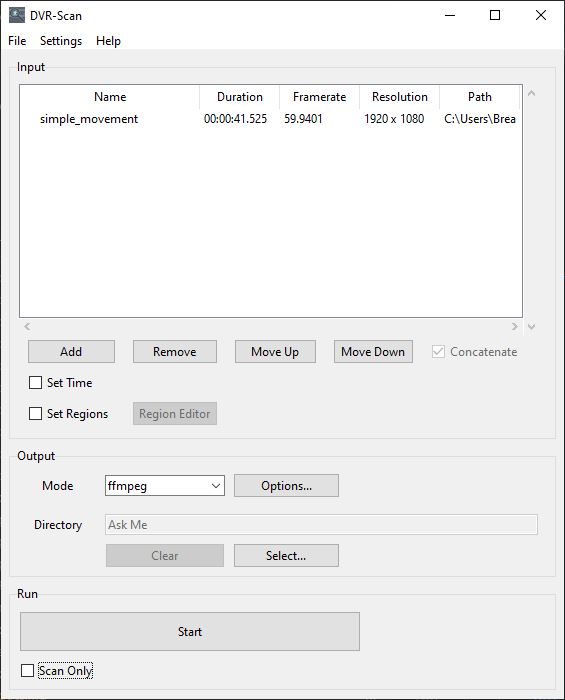
The UI can be started by running dvr-scan-app, and is installed alongside the existing command line interface dvr-scan. Config settings and region files can be shared seamlessly between both. Feedback on the new UI is welcome.
Changelog
- [feature] New GUI now available across all platforms, can be launched via
dvr-scan-app- Has UI elements for all settings, supports editing motion regions
- Shows scan progress in real-time
- [feature] Add ability to control video decoder via
input-modeconfig option (opencv,pyav,moviepy)- Allows switching between
OpenCV(default),PyAV, andMoviePyfor video decoding - Certain backends provide substantial performance benefits, up to 50% in some cases (let us know which one works best!)
- Allows switching between
- [bugfix] Fix crash on headless systems that don't have
pillowinstalled - [general] The region editor no longer prompts for a save path if one was already specified via the
-s/--save-regionsoption - [general] A size-limited logfile is now kept locally, useful for filing bug reports
- Can be controlled with config file options
save-log(default: yes),max-log-size(default: 20 kB),max-log-files(default: 4) - Path can be found under help entry for
--logfileby runningdvr-scan --helpordvr-scan-app --help
- Can be controlled with config file options
- [general] Minimum supported Python version is now 3.9
DVR-Scan 1.6
1.6.2 (2024-12-17)
- [feature] Vastly improved region editor UI:
- Reimplemented entire UI with Tcl/Tk to provide much more consistent experience across platforms
- All options now have dedicated UI controls in addition to keyboard shortcuts
- System-specific shortcuts like undo/redo now work as expected
- Various performance and usability improvements including zoom/pan and shape selection
- [feature] Add new
variance-thresholdconfig option to control how MOG2 controls which pixels are described by the current background model #163 - [feature] Add new
--thumbnailsoption to extract images from each event, use--thumbnails highscoreto save frame with highest motion score #159 - [feature] Add
--use-ptsoption to allow using presentation time instead of frame number for timestamps #170 - [bugfix] Fix incorrect framerate detection in Windows builds #174
- [general] Updates to Windows distributions:
- Python 3.9 -> Python 3.12
- OpenCV 4.10.0.82 -> 4.10.0.84
- Ffmpeg 6.0 -> 7.1
1.6.1 (2024-06-18)
Release Notes
DVR-Scan 1.6.1 includes some important fixes and improvements for the region editor. Minimum supported Python version is now 3.8.
Changelog
- [bugfix] Corrupt frames are no longer encoded and are skipped when encoding #151
- [bugfix] Fix
region-editorconfig file option having no effect #154 - [bugfix] The region editor now always prompts on any unsaved changes #161
- [general] The region editor no longer prompts for a save path if
-s/--save-regionwas specified - [general] Regions added via command line are now be merged with those loaded from the
load-regionconfig option - [general] Add new
learning-rateconfig option to control how fast the background model is updated- Value between
0.0and1.0controls how much weight is placed on next frame, or-1for auto 0.0implies no update to the model,1.0will re-initialize it completely on each frame- Default value of
-1is for automatic, which is unchanged from previous releases
- Value between
1.6 (2023-11-15)
Release Notes
DVR-Scan greatly improves masking capabilities with the new region editor (user guide):
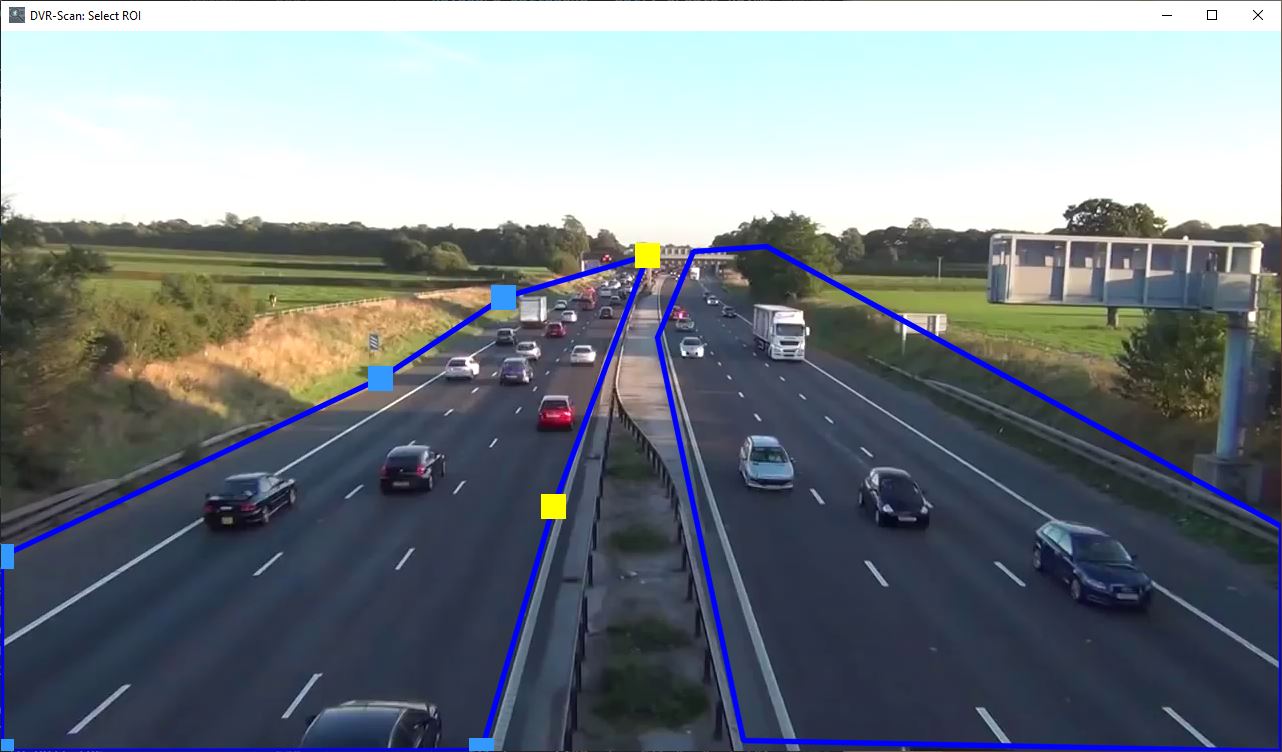
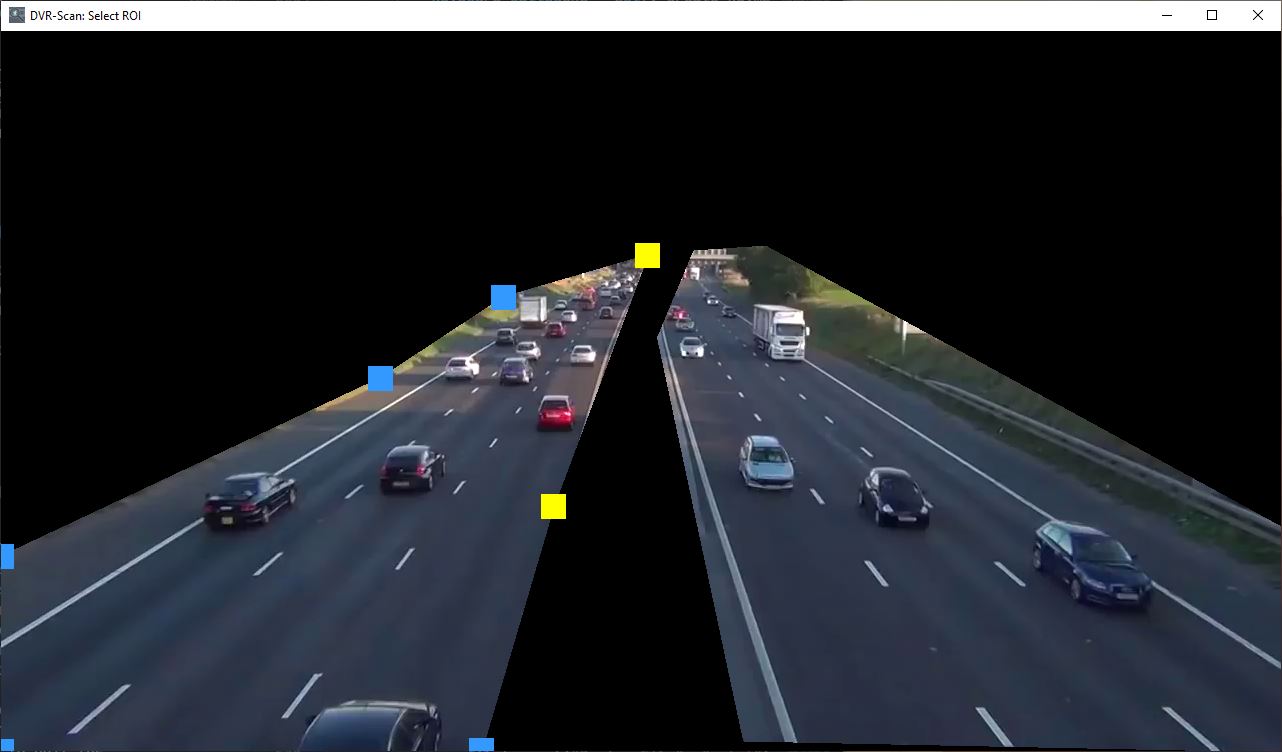
Multiple regions can now be defined with any shape, size, and complexity. Region data can be saved to a file and loaded again. Regions can also be specified by command line.
There are also several other bugfixes and improvements, such as improved seeking performance.
Changelog
- [feature] New region editor
-r/--region-editorallows creation of multiple regions without shape restrictions, replaces-roi/--region-of-interest - [feature] Multiple regions of interest (rectangular or polygonal) can now be created:
- Using the new region editor by adding the
-r/--region-editorflag:dvr-scan -i video.mp4 -r - New
-a/--add-regionreplaces-roi/--region-of-interestoption:dvr-scan -i video.mp4 -a 5 5 20 5 20 20 5 20 - Regions can now be saved to a file: press S in the region editor or use
-s/--save-region - Regions can now be loaded from a file: press O in the region editor or use
-R/--load-region - Config files can specify a region file to use by default with the
load-regionoption, replaces theregion-of-interestsetting
- Using the new region editor by adding the
- [feature] New
-fm/--frame-metricsoption draws motion score on each frame to help tune detection parameters - [cli] Short flag
-vis now used for--verbosity, replaced by-Vfor--version - [cli]
-roi/--region-of-interestis now deprecated, replaced by region editor and add/save/load region flags- Specifying this option will display the ROI in the new region format allowing you to update usages more easily
- [general] Improved seeking performance, using
-st/--start-timeis now much faster (#92) -detection-parameters) - [general] Noise reduction kernel can now be disabled by setting
-k/--kernel-sizeto0(#123) - [general] Include stack traces in logfiles when setting
--verbosity debug - [bugfix] Add
max-scoreoption to config file to fix CNT mode always treating first few frame as motion, default is 255.0 #119 - [bugfix] Fix timecode format
HH:MM:SS[.nnn]being rejected for start/end time (#141) - [bugfix] Fix incorrect RGB mapping for config file (values were treated as BGR instead)
- [other] Config option
timecodehas been renamed totime-codeto match the command-line option - [other] Config options that started with
timecode-have been renamed to start withtext-, and are now shared between thetime-codeandframe-metricsoverlays:time-code-marginis nowtext-margintime-code-font-scaleis nowtext-font-scaletime-code-font-thicknessis nowtext-font-thicknesstime-code-font-coloris nowtext-font-colortime-code-bg-coloris nowtext-bg-color
Known Issues
- Some prebuilt archives include documentation which references the
load-regionconfig option with the incorrect name (region-file) #153
DVR-Scan 1.5
1.5.1 (2022-08-15)
Changelog
- [bugfix] Fix crash when opening multiple input videos (#95)
- [bugfix] Fix incorrect warning regarding frame decode failures at end of video
1.5 (2022-07-30)
Release Notes
- Significant performance improvements on multicore systems
- Support wildcards/globs as inputs for scanning entire folders (
-i folder/*.mp4) - Allow use of ffmpeg for better output quality (
-m ffmpeg) or codec-copying mode (-m copy) - Configuration files are now supported, see documentation for details
- Can specify config file path with
-c/--config, or create advr-scan.cfgfile in your user config folder
- Can specify config file path with
- Windows binaries are now signed, thanks SignPath.io (certificate by SignPath Foundation)
- Experimental Nvidia CUDA® support has been added (set
-b MOG2_CUDA)- If installing via
pip, requires manual installation of OpenCV compiled with CUDA support - If downloading Windows version, make sure to download the GPU-enabled build (
dvr-scan-1.5-win64-cuda.zip) - CUDA-enabled builds are not code signed, and do not include the
CNTmethod
- If installing via
- Minimum supported Python version is now 3.7
- Minimum supported OpenCV version is now 3.x
Command-Line Changes
- New options:
-c/--config- set path to config file-d/--output-dir- set directory to write output files (default is working directory)-m/--output-mode- set output mode (one of:opencv,ffmpeg,copy)-mo/--mask-output- path to write motion mask for analysis--verbosityand--logfile- control output verbosity and path to save output
-i/--inputnow supports globs/wildcards to scan entire folders, e.g.-i folder/*.mp4- Change default value for
-l/--min-event-lengthto 0.1 seconds, previously was 2 frames - Long form of
-roihas been renamed to--region-of-interest(previously was--rectangle-of-interest) -cis now used for--config, previously was for--codec- Add experimental
MOG2_CUDAoption for-b/--bg-subtractor - Rename existing
MOGoption toMOG2 --codechas been removed, the value should now be set using a config file
Changelog
- [feature] Configuration file support and new
-c/--configargument to specify path to config files (#77)- Breaks existing behavior of
-c(was previously the shortform of--codec)
- Breaks existing behavior of
- [feature] Add support for multiple output modes via
-m/--output-modeargument (#27, #42) - [feature] Experimental support for GPU-based CUDA MOG2 filter (#12)
- [feature] Video encoding and decoding are now done in parallel with the scanning logic leading to improved performance on most systems (#52)
- [feature] Add support for exporting motion masks via
-mo/--mask-outputargument- Useful for detailed analysis or tuning of detection parameters
- ffmpeg can be used to generate output videos by specifying
-m ffmpeg - Codec-copy mode, using ffmpeg, can be used by specifying
-m copy
- [feature] Add
--verbosityand--logfilearguments to provide more control over program output - [feature] Allow scanning entire folders using wildcards with
-i/--input(#5)- Glob expansion is also performed on each input path directly, so quoted globs also function correctly
- [bugfix] Fix incorrect results when
-st/--start-timeis set - [bugfix] Event start times are now correctly calculated when using
-fs/--frame-skip(#68, #70)- Note that all skipped frames within the event window are included in motion event, thus the calculated start time may be slightly earlier
- [bugfix] Only get screen resolution when required (was causing issues on headless machines)
- [bugfix] Fix output messages conflicting with progress bar shown during scanning
- [bugfix] Output events now start from 1 to align with the event list
- [bugfix] Event end times now include the presentation duration of the last frame
- [bugfix] Small values for
-l/--min-event-lengthare now handled correctly, previously would cause an error - [enhancement] Progress bar now indicates how many events have been detected so far
- [enhancement] Change default value for
min_event_lento 0.1 seconds, previously was 2 frames (#91)
Known Issues
- Attempting to open multiple input videos will cause DVR-Scan to crash, fixed in v1.5.1 (#95)
- Variable framerate videos (VFR) are not fully supported, and will yield incorrect timestamps (#20)
- Video output when using frame skip and
-m opencv(default output mode) will result in frames missing from the exported videos (#81)- Use
-m ffmpegor-m copyas a workaround
- Use
- Multiple input videos are not supported with
-m ffmpegor-m copy(#86)- Use ffmpeg to concatenate/merge input videos before processing as a workaround
- CUDA builds do not include the
CNToption for-b/--bg-subtractor
DVR-Scan 1.4
1.4.1 (2022-02-20)
Release Notes
This release includes fixes for incorrect event start/end times when using frame skipping, and improvements to the bounding box overlays.
Important: Aside from critical bugfixes, DVR-Scan 1.4.x is the last minor version supporting Python 2.7. Starting from v1.5, the new minimum supported Python version will be 3.6 (see #83 for details).
Changelog
- [bugfix] Event start times are now correctly calculated when using
-fs/--frame-skip(#68, #70)- Note that event start/end times may still be off by how many frames are skipped due to loss of context with respect to frame-accurate motion detection
- [bugfix] Event end times now take into account the number of skipped frames if
-fs/--frame-skipif specified (e.g. it is assumed all skipped frames contained motion) - [bugfix] Bounding box smoothing now takes into account
-fs/--frame-skip(#31) - [bugfix] Bounding boxes now cover all frames with motion (#31)
- In v1.4 only the frames after
-l/--min-event-lengthframes had passed were covered
- In v1.4 only the frames after
Known Issues
- Variable framerate videos (VFR) are not fully supported, and will yield incorrect timestamps (#20)
- Using
-st/--start-timewill yield incorrect results - If a motion event happens to be exactly the number of frames specified by
-l/--min-event-length, the end timecode will be displayed incorrectly (#90)
1.4 (2022-02-08)
Release Notes
In addition to several bugfixes, this release of DVR-Scan adds the ability to draw a bounding box around the area in the frame where motion was detected. There are also several improves when using -fs/--frame-skip and/or -df/--downscale-factor by ensuring all other option are relative to the original video framerate/resolution.
Important: Aside from critical bugfixes, DVR-Scan 1.4.x is the last minor version supporting Python 2.7. Starting from v1.5, the new minimum supported Python version will be 3.6 (see #83 for details).
Changelog
- [feature] Add new
--bb/--bounding-boxoption to draw rectangle around the area in the video where motion was detected- An amount to temporally smooth the box in time can also be specified after
-bb(e.g.-bb 0.5s), where the default is 0.1s
- An amount to temporally smooth the box in time can also be specified after
- [bugfix] Processing errors should now return a non-zero exit code
- [bugfix] Allow a maximum window size to be set when using
-roi(#59):- The
-roiflag now accepts a maximum window size for the ROI selection window (e.g.-roi 1920 1080) - If the
screeninfopackage is installed, or you are using a Windows build, videos will automatically be resized to the maximum screen size
- The
- [bugfix] Fix frozen timestamp at beginning of video (#68)
- [bugfix] Fix output videos not including all of the duration specified by
-tb/--time-beforein certain cases (#68 - [bugfix] Fix event start times not reflecting
-l/--min-event-lengthand-tb/--time-before(#68 - [bugfix] Scanning no longer stops suddenly after a frame fails to decode (#62)
- If more than 1 corrupt frame is found, a warning will be displayed with the number of frame decode failures
- If more than 5 frames in a row fail to be decoded, processing will stop and display an error
- [bugfix] When no events have been found, an empty file is no longer created if
-o/--outputis specified - [enhancement]
-k/--kernel-sizeis now relative to the original video resolution, and will be reduced to adjust for-df/--downscale-factorif set (#46) - [bugfix] Output videos now have the correct playback speed when using
-fs/--frame-skipby reducing the framerate (#70) - [bugfix] The
-l/--min-event-lengthand-tp/--time-post-eventparameters are now adjusted to compensate for-fs/--frame-skipif set (#70) - [bugfix] An erroneus event (false positive) is no longer generated at the beginning of a video when
-l/--min-event-lengthis equal to 1 frame
Known Issues
- Variable framerate videos (VFR) are not fully supported, and will yield incorrect timestamps (#20)
- When using
-fs/--frame-skip, event start times do not include all of-tb/--time-before-event(#68, #70) - When using
-bb/--bounding-box, the amount of time covered by-l/--min-event-lengthwill be missing bounding box overlays (#31) - Using
-st/--start-timewill yield incorrect results - If a motion event happens to be exactly the number of frames specified by
-l/--min-event-length, the end timecode will be displayed incorrectly (#90)
DVR-Scan 1.3
1.3 (2021-06-23)
Release Notes
This version of DVR-Scan includes a new, faster background subtraction algorithm (-b CNT). Results may be slightly different when using this method, so any feedback is most welcome.
Changelog
- [feature] Add new
-b/--bg-subtractorargument to allow selecting between the MOG and CNT background subtractor types (e.g.dvr-scan -b CNT). Resolves #48. The following background subtractor types are available:MOGis the defaultCNTis a newer, faster algorithm (feedback is welcome)
- [bugfix] When using the
-o/--outputargument, a file is no longer written to disk if no motion events are found in the input file (#50)
Known Issues
- Variable framerate videos (VFR) are not fully supported, and will yield incorrect timestamps (#20)
- Using the
-roiflag with high resolution videos can result in the window exceeding the size of the monitor (#59) - When using
-tc/--time-codethe start of the video may have a frozen timestamp (#68) - The kernel size must be manually adjusted when using
-df/--downscale-factor(#46) - When using
--frame-skip, the--min-event-lengthparameter must be manually adjusted, and exported clips will have the wrong playback speed
DVR-Scan 1.2
1.2 (2021-03-10)
Changelog
- [bugfix] Fix quiet mode (
-q/--quiet) not working correctly (#19, #35) - [bugfix] Fix downscale factor (
-df/--downscale-factor) having no effect (#46) - [api] Swap order of
fpsandtimecodearguments inFrameTimecodeconstructor to match that of PySceneDetect (#33) - [api] Refactor ScanContext class for better usage from Python (#33)
- [api] Use named logger rather than print statements (#35)
Known Issues
- When using the
-o/--outputargument, a file is still written to disk even if no motion events are discovered in the input file (#50) - Variable framerate videos (VFR) are not fully supported, and will yield incorrect timestamps (#20)
DVR-Scan 1.1
1.1 (2020-07-12)
Changelog
- [feature] Add new
-roiargument to allow specifying a rectangular detection window, can select graphically or specify x/y/w/h via command line (thanks @klucsik) - [bugfix] Fixed broken OpenCV compatibility layer causing issues with OpenCV 3.0+
- [general] Released project on pip, pinned OpenCV version requirement
Known Issues
- Quiet mode (
-q/--quiet) does not work correctly - Variable framerate videos (VFR) are not fully supported, and will yield incorrect timestamps (#20)
DVR-Scan 1.0
1.0.1 (2017-01-12)
- [bugfix] unhandled exception affecting users running source distributions under Python 2.7 environments
1.0 (2017-01-11)
- [feature] detects motion events with configurable sensitivity and noise removal thresholds
- [feature] output events to individual video files, or as a single-file compilation
- [feature] allows input seeking, frame skipping, and output suppression mode
- [feature] configurable detection windows and pre/post-event inclusion length
In Development
DVR-Scan 1.9
Release Notes
Simplifies the application with a new Scan Wizard, settings presets, and drag-and-drop support.
Changelog
- [general] Modernize project branding and logos, improve legibility at smaller sizes
- [feature] New Scan Wizard provides a simplified step-by-step workflow (add videos, pick a preset, choose output, scan) and is now the default mode when launching
dvr-scan-app- Set the new
startup-modeconfig option toclassicto start in the full settings view instead; you can also switch between modes at any time
- Set the new
- [feature] Settings presets: a new preset dropdown in the app allows applying built-in presets or saving your own
- User presets are config files stored in a
presetsfolder next to the user config file (Settings -> Open Presets Folder) - The
Defaultpreset is the user config file itself, replacing theSave As User DefaultandReset To User Defaultmenu items
- User presets are config files stored in a
- [feature] Video files can now be dragged and dropped onto the app window to add them as inputs; dropping a
.cfgfile loads it as the active settings